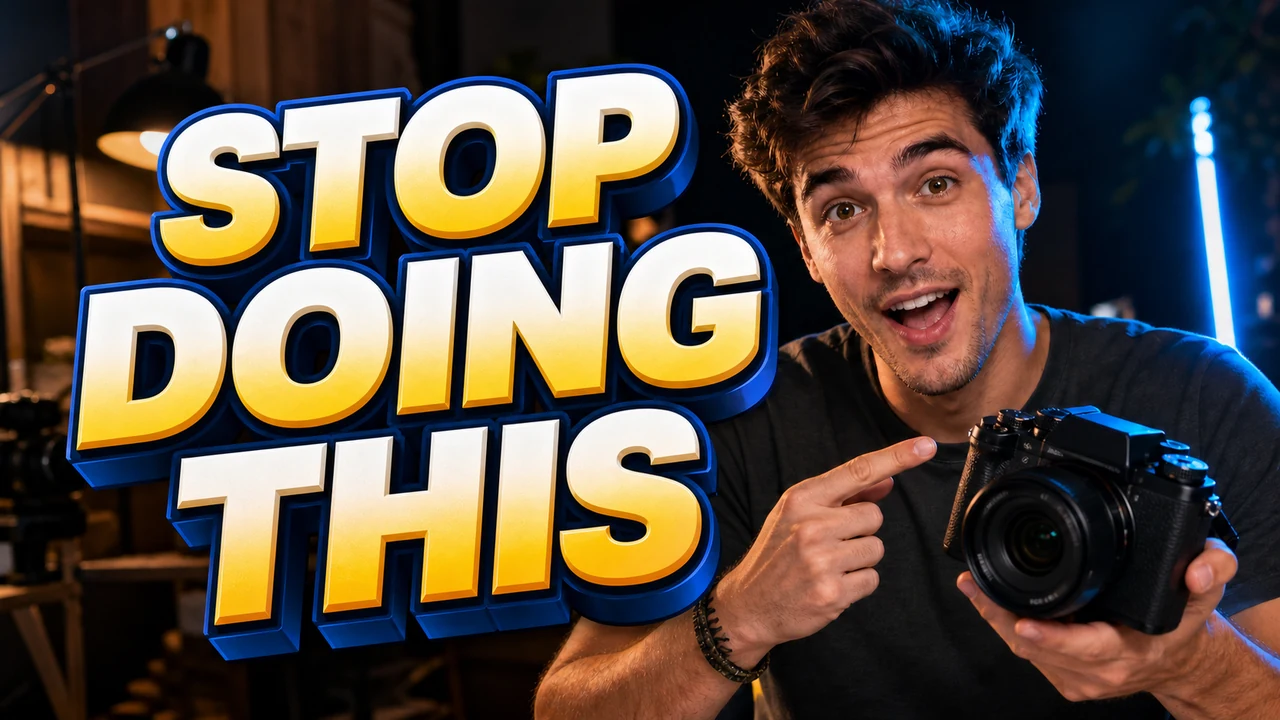
I was staring at the exported cover for our episodic video series where the presenter's expression, lighting, and background came out clean. The bottom corner carried a prominent label that read PART 1, and the publishing schedule demanded PART 2 for the upcoming release. If I tried generating an entirely new graphic, the facial structure and ambient lighting would shift away from the original portrait. Rebuilding the visual from scratch meant wasting hours adjusting color grades just to match what was already sitting on my storage drive.
Series thumbnails present a particular challenge because visual continuity establishes familiarity across an audience feed. When viewers follow an ongoing playlist, subtle visual cues like consistent framing, background colors, and lighting give the release an identifiable identity. If you replace the entire background just to update an episode number, that visual link breaks immediately. Keeping the exact same expression and background elements maintains the narrative thread across successive episodes.
When an image exports as a flat graphic file, the lettering ceases to exist as an adjustable typographic box. Those bold letters become permanent clusters of color values fused against background shadows, fabric textures, and edge contours. If you still have access to the master design project, going back to update the original text layer remains the cleanest path forward. The headache starts when the original artwork is nowhere to be found, leaving you with nothing more than an isolated image file.
Creators frequently ask for the absolute best software to fix cover typography, but the label depends heavily on what assets you actually hold. A full-featured desktop suite or cloud design platform excels when you possess raw vector shapes, unflattened assets, and installed font families. When you only possess a flattened raster image, those traditional layout suites suddenly demand tedious clone stamping and manual repainting. Choosing the proper utility requires understanding whether you are manipulating a flexible design canvas or reconstructing locked pixels.
To understand how different workflows function during an asset update, consider how source formats influence your editing options. Every environment treats letterforms according to their internal structure, dictating how much effort you must invest to revise a single title.
| Asset State | Source Structure | What You Walk Away With |
|---|---|---|
| Design File Workspace | Vector text boxes and unmerged visual layers | Exact vector typography exported to fresh image formats |
| Exported Flat Graphic | Solid raster pixels with fused lettering | Direct pixel reconstruction matching visible lighting and tone |
| Scanned Preview Canvas | Compressed display assets lacking source files | Repaired display graphics suitable for active catalog updates |
When you operate inside an application like Photoshop or Canva, typography exists as distinct data separated from underlying imagery. You simply double-click the boundary box, type your revisions, and render a fresh export with zero disruption to the background artwork. The trouble emerges whenever you inherit flattened deliverables from an editor, an agency, or a legacy archive that lacks project files. Under those circumstances, treating the cover as a dynamic layout environment is impossible because the software only sees raw pixel coordinates.
This is where a specialized Thumbnail Text Editor changes the practical approach for content managers. Rather than forcing you to paint over the graphic and track down identical typography packs, modern models examine the visible visual traits directly on the canvas. The engine analyzes existing letter thickness, drop shadows, color gradients, and surface textures to recreate replacement wording naturally. It strives to mirror visible styling across the surrounding frame, though it never claims to extract an authentic desktop font file.
Thumbnail graphics rarely rely on plain, unadorned typography set against flat color blocks. Designers frequently apply heavy gradients, metallic edge bevels, chromatic drop shadows, and subtle outer glows to help titles stand out against busy video scenes. Replicating those composite styling layers manually inside a blank design project requires hunting down the exact font package and rebuilding every styling effect from memory. The neural model bypasses that manual reconstruction by analyzing the collective visual presentation directly on the canvas.
You always supply the exact replacement text yourself by typing your chosen words into the input box. The system does not offer speculative automated copywriting or automated translation suggestions that guess what your message should state. You maintain absolute authority over the phrasing, casing, and punctuation of the revision. This hands-on input guarantees that specific branding rules, industry jargon, and episode identifiers remain entirely under your deliberate oversight.
When updating channel graphics, you frequently need to adjust one phrase while keeping adjacent information completely untouched. For creators who frequently Edit YouTube Thumbnail Text, preserving secondary tags or brand badges is just as important as modifying main titles. Our platform handles this by running an initial detection sweep across the graphic surface to map individual text segments. This text recognition stage does not consume any credits, allowing you to review identified zones before committing resources.
Once the system highlights the detected phrases, you can engage the lock feature on any specific line. Locking a line instructs the rendering process to freeze those exact pixels in place while you replace adjacent lettering. If your cover features an established series logo alongside the episode number, you can lock the logo line and safely modify only the numerical sequence. This targeted isolation prevents accidental distortion across nearby character strokes, ensuring that critical branding remains stable across your visual catalog.
We believe software tools should communicate operational costs with total transparency. When you create an account and sign in, you receive trial credits to test the interface on your own flattened assets. We do not provide limitless complimentary rendering, nor do we support unattended bulk automation through developer endpoints. Every generation costs a predictable credit balance based purely on resolution tiers: 1K output requires 10 credits, 2K generation takes 20 credits, and high-fidelity 4K output consumes 30 credits.
Selecting the appropriate output tier depends on where and how you plan to deploy the final asset. Standard 1K outputs serve regular video streaming displays cleanly, while 2K and 4K tiers provide the necessary clarity for high-resolution displays or archival storage. Because credit expenditure scales with output resolution, you can match your spending directly to the technical requirements of your specific release. This predictability eliminates surprise subscription fees and lets you allocate credits deliberately across your editorial schedule.
This structured model reflects the computational requirements involved in localized raster regeneration. When artists use our tools to Edit Text in Image, they understand that pixel reconstruction operates under realistic digital boundaries. It does not perform lossless mathematical vector editing, meaning complex vintage calligraphy or heavily distressed custom textures might display slight visual differences upon close inspection. The goal is to provide a cohesive visual replacement that holds up cleanly across modern viewing grids.
You will notice that we never make extravagant claims regarding your video performance or viewer discovery. Changing a word on an exported visual does not guarantee higher viewership, longer watch sessions, or elevated positions on recommendation feeds. Content reach depends on storytelling strength, audience satisfaction, and creative pacing rather than the software used to revise a thumbnail graphic. We treat our editor as a practical visual repair utility, not a speculative marketing growth engine.
Avoid tools that market themselves through exaggerated promises of instant audience expansion. A clean cover helps clarify your topic, but viewers evaluate your entire production once they choose to watch your material. Treating thumbnail management as a reliable maintenance routine keeps your expectations grounded and your creative focus where it belongs. When you view typography editing as practical asset recovery, you save valuable time without falling for promotional hype.
If your computer still contains the layered master file, always launch your dedicated layout program and revise the text box there. That native pathway gives you absolute typographic precision and allows you to adjust kerning or line spacing down to the individual point. Relying on raster reconstruction when you already own the editable vector file simply adds unnecessary guesswork to your workflow. Always inspect your local project archives before deciding how to approach a necessary title revision.
When those layered files are lost, locked away, or simply unavailable, our editor provides a dependable bridge for your creative assets. You avoid the frustrating prospect of rebuilding an entire graphic from scratch or ruining a solid portrait with sloppy manual brush strokes. By typing your desired phrasing, locking the lines you wish to preserve, and generating a targeted pixel replacement, you keep your production pipeline moving. That straightforward reliability is what makes thoughtful digital tools truly useful for modern digital workflows.
Thumbnail Text Editor
Edit baked-in words on video covers with our free online thumbnail text editor and style matching.
The Bottom Line
Managing visual assets across expanding channels requires realistic methods rather than grand promises. When your graphics are flattened into static raster files, finding a practical way to swap text while safeguarding background details keeps your brand consistent. By locking critical lines and directly typing your updates, you resolve layout bottlenecks without sacrificing visual continuity.
The right choice always depends on the file currently sitting on your workstation. Value the layered projects you have, and use focused pixel editing whenever flattened formats leave you with no other alternative. Keeping your toolkit straightforward ensures you spend less energy wrestling with lost source files and more energy creating compelling work.
Sources
- https://zhuanlan.zhihu.com/p/2042181678433658606
- https://en.wikipedia.org/wiki/Online_video_platform
- https://en.wikipedia.org/wiki/Streaming_media
- https://en.wikipedia.org/wiki/Video_hosting_service