I opened my browser yesterday evening with a flattened promotional banner staring back at me from the desktop. The marketing schedule had shifted, which meant the bold lettering stating ENDS MAY 1 needed to read ENDS MAY 8 before our morning launch. The source files were trapped on an inaccessible office drive, and the original designer had already logged off for the weekend.
If you have ever confronted a locked marketing image on short notice, you know how frustrating flattened bitmaps can be. Placing a generic solid block over the old date completely ruins the background texture and makes the graphic look like an unpolished draft. I needed a direct way to swap the characters inside the image surface without damaging the underlying visual aesthetic.
Many online graphics platforms market themselves as free, only to lock every single screen behind an aggressive paywall before you can even test their tools. I prefer total transparency about how the technology works so you can plan your edits without surprises. In our system, the detection phase and text inspection tools are completely free to use.
When you upload an image, our optical recognition runs across the entire visual field without deducting any credits from your account balance. You can review every identified phrase, inspect the detected bounding areas, and type your new replacement text into the interface at zero cost. This initial scanning allows you to confirm that the software reads your lettering properly before committing resources.
Spending credits only occurs when you instruct the neural engine to repaint the pixels and generate a revised image file. Once you sign into your account, you receive trial credits to test the generation workflow on your own files. These trial credits give you a practical way to evaluate output quality and visual harmony on real projects.
The credit cost scale corresponds directly to the output resolution you select for the finished graphic. Generating a standard output at 1K resolution consumes 10 credits from your balance. Moving up to a sharper 2K resolution costs 20 credits, while exporting a high-detail 4K render requires 30 credits.
We do not offer unlimited free image generation, and we do not pretend that high-resolution neural rendering comes without computing costs. What you receive instead is honest utility: complete free scanning, trial credits upon signing in, and transparent pricing when you produce final artwork. This setup lets you test the interface thoroughly while preserving your credit balance for finished assets.
Traditional photo editors force you to make an unpleasant compromise when you work with flattened files. You either spend time manually cloning adjacent background pixels with a brush, or you paste a solid rectangular badge over the text and type over it. Both approaches produce a jarring visual patch that degrades the professionalism of your marketing assets.
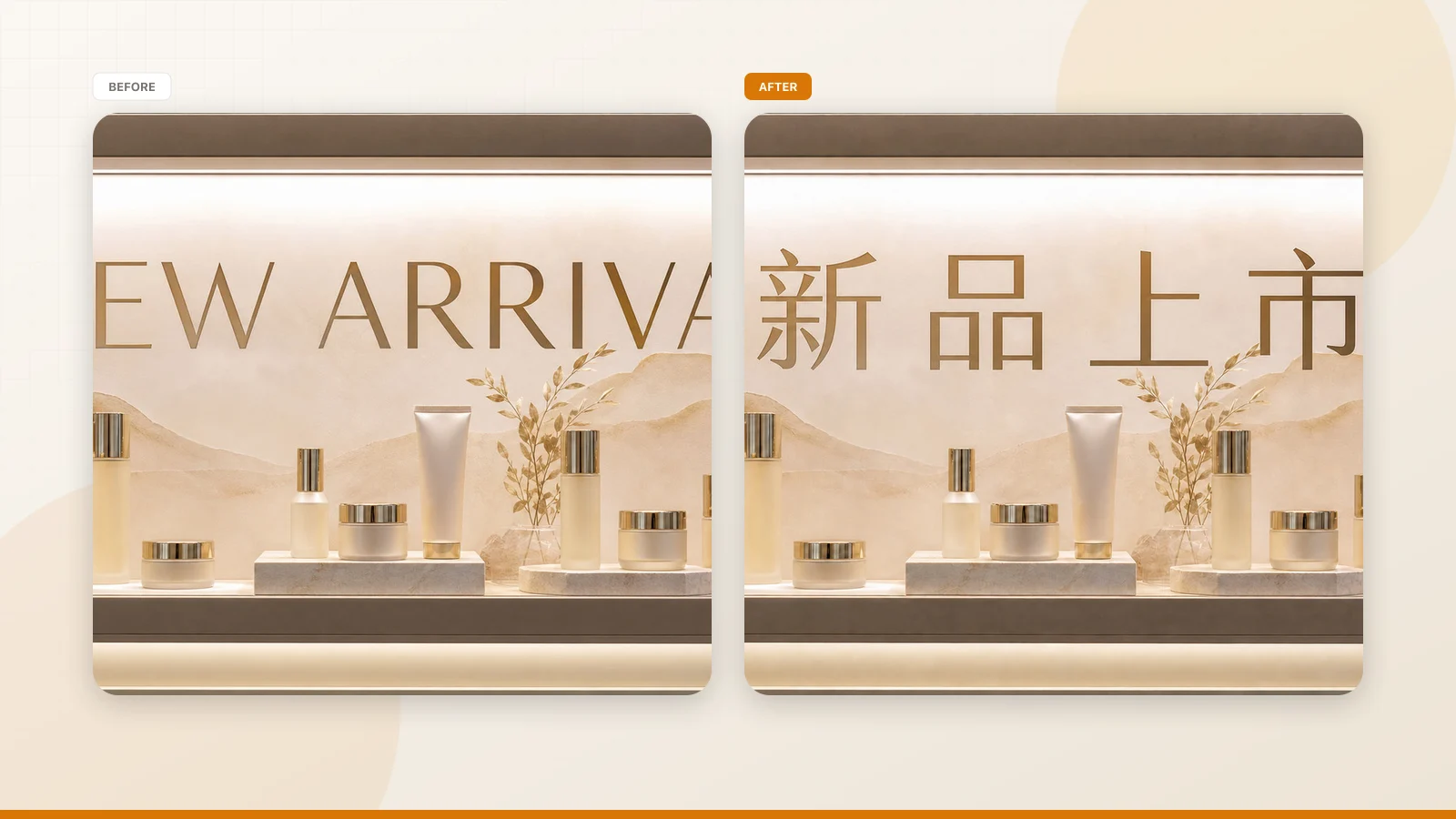
When you use Replace Text in Image, the software modifies the raster surface from within. The synthesis model removes the original character forms and paints new typography directly into the existing background grain. This creates a cohesive revision that retains the lighting, shadows, and natural color gradients of the original visual.
In my banner project, the lettering for ENDS MAY 1 was positioned over a subtle textured wash with an angled drop shadow. Slapping a digital rectangle over that area would have severed the shadow line and created an ugly interruption. Synthesizing the replacement ensured that the gradient and shadow continued behind the newly drawn numeral eight.
After you upload a graphic, the inspection dashboard presents the extracted text as distinct lines rather than a monolithic block of copy. Each recognized line receives an individual input field where you can review the detected text and enter your desired wording. This separated structure gives you granular authority over every phrase across the image canvas.
Beside each text input field, you will find an individual lock toggle. It is essential to remember that this lock secures a recognized line of text, not a traditional Photoshop layer. When you lock a line, the rendering engine treats those specific coordinates as protected territory and leaves the pixels untouched during generation.
This line-locking capability prevents neighboring typography from shifting or mutating while you edit an adjacent date. On my promotional banner, I locked the main event title and the informational subhead above the deadline notice. That instruction ensured the engine focused all its attention on changing ENDS MAY 1 to ENDS MAY 8 without disturbing adjacent lines.
Leaving a field empty removes that line of text completely. The neural engine cleans the designated coordinates and fills the surrounding background pattern naturally over the empty space.
Unlike experimental assistants that offer automated phrasing suggestions, this platform puts you in total control of the written copy. You enter your replacement text directly into each active field, ensuring that specific dates, names, or brand terms appear exactly as intended. There are no automated guess algorithms rewriting your promotional calendar.
When you rely on Edit Text in Image, the platform reads your typed string and paints it by visually matching the surrounding aesthetic. The system analyzes stroke width, letter inclination, edge contrast, and local color distribution. It then draws fresh characters that blend seamlessly with the typography present in the surrounding composition.
This mechanism operates as a best-effort visual matching system rather than a typography extraction utility. The software does not extract font files, nor does it yield a mathematically lossless vector file. Instead, it generates a rasterized surface where the synthesized letters imitate the visual presence of the original design.
Because the engine synthesizes pixels rather than installing true font software, results depend on the visual clarity of the surrounding artwork. Clear lettering with well-defined edges gives the model ample reference information for replicating stroke geometry. If your source graphic exhibits severe compression distortion, the regenerated characters will naturally mirror that softer photographic quality.
The studio supports standard static image formats, including static PNG, JPG, and WebP files. It is engineered specifically for still social banners, event flyers, web hero graphics, and digital product packaging mockups. Working with clean static files ensures that character boundaries remain distinct throughout the initial scanning step.
There is no batch API for programmatic manipulation across massive image catalogs. The platform is designed as an interactive desktop workspace where you inspect each file and evaluate changes manually. This intentional single-image workflow guarantees that you maintain visual quality oversight on every asset you revise.
When you choose to Change Text in Image, treating every asset as an individual review task yields the most reliable results. You check the detected characters, verify that the new dates align with your campaign goals, and allocate your trial credits deliberately. This conscious workflow prevents wasted renderings and keeps your revisions sharp and effective.
Selecting an appropriate resolution tier allows you to manage your trial credit balance efficiently across different marketing tasks. For quick previews, social media thumbnails, or mobile chat banners, the 1K tier at 10 credits delivers adequate visual clarity. It processes smoothly while conserving your balance as you evaluate visual balance.
When your graphic must appear on standard desktop websites or high-resolution marketing portals, the 2K setting at 20 credits provides the ideal balance of sharpness and cost. It preserves micro-contrasts, cleans up subtle letter edges, and maintains delicate color transitions. I selected the 2K option for my extended banner because the image needed to sit prominently across our primary landing page.
For large hero banners or high-resolution visual presentations, the 4K tier at 30 credits provides maximum rendering fidelity. At this level, the neural engine calculates intricate background grain and subtle edge bevels with exceptional care. Choosing between these three tiers gives you full discretion over how your credit allotment is invested.
Because detection and text input remain free prior to generation, you can experiment freely without financial penalty. You can type several date variations, test different character arrangements, and adjust line locks until the composition feels right. You only spend credits once you are satisfied with your layout and confirm the render.
To achieve the most convincing visual outcome, keep replacement strings reasonably close to the character count of the original copy. Changing ENDS MAY 1 to ENDS MAY 8 succeeds effortlessly because both phrases occupy roughly the same spatial footprint. If you try to replace a short date with a long promotional sentence, the engine must squeeze the lettering into an unnatural space.
Before uploading your image, take a moment to confirm that the text remains legible to an ordinary human viewer. When letters are obscured by excessive digital compression or extreme lens blur, the scanning algorithm will have difficulty establishing character baselines. Starting with an uncorrupted PNG or clean JPG guarantees that the free scan captures the original phrase accurately.
Replace Text in Image
Use our free online photo text replacer to swap existing words in images, not just text overlays.
The Bottom Line
Updating text within a flattened graphic no longer requires rebuilding design files from scratch or ruining layouts with clumsy patches. Our platform lets you run detection for free, lock unaffected lines, and type your replacement text before spending a single credit. When you are ready to produce final graphics, trial credits let you render at 1K for 10 credits, 2K for 20 credits, or 4K for 30 credits.
The underlying system uses best-effort visual matching to blend new characters into your existing artwork without requiring original font packages. There are no automated batch APIs, no deceptive claims of unlimited free rendering, and no confusing hidden subscriptions. You maintain complete creative oversight from the initial scan to the finished download.
Sources
- https://en.wikipedia.org/wiki/Erratum
- https://en.wikipedia.org/wiki/Revision
- https://en.wikipedia.org/wiki/Cost