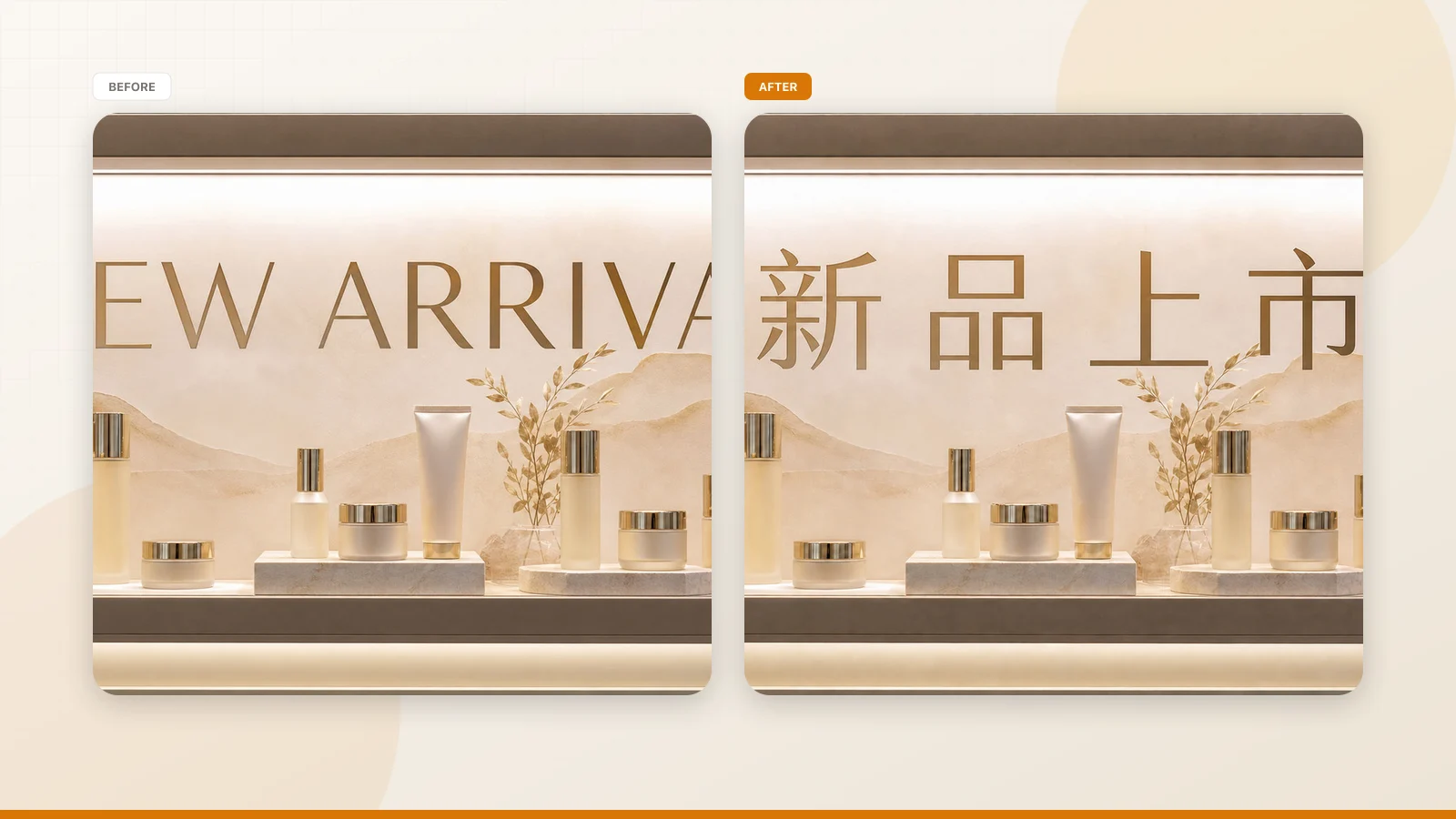
I recently stood in front of a retail mockup where a promotional shelf lightbox displayed the words "NEW ARRIVAL." The visual director wanted a localized version reading "新品上市" for a regional display run, but the master design assets were missing. Pointing a smartphone at the lightbox translated the phrase immediately, yet that temporary camera overlay vanished the moment we lowered the device. We were still left without a usable image file because understanding words on a sign is entirely different from producing a deliverable graphic.
That moment highlighted a common misunderstanding across visual production teams. When you need to decipher an overseas label while shopping or reviewing merchandise, standard mobile translation tools solve the problem without payment. But once you need a downloadable graphic with replaced lettering, background texture reconstruction, and consistent typographic weight, the requirements change completely. I see teams confuse these two workflows constantly, mostly because software marketing often groups distinct tasks under the broad promise of free image translation.
When a platform claims you can translate text in an image online for free, you must examine whether it delivers temporary viewing or actual file generation. Most zero-cost utilities merely project floating text over your screen or transcribe characters to your clipboard. Those tools never alter the underlying pixels, nor do they rebuild background patterns obscured by original letters. They are lightweight optical character recognition utilities paired with standard machine translation dictionaries.
Generating a replacement image is an intensive computational process requiring dedicated rendering resources. The underlying engine must identify each letterform, calculate background color gradients, assess typography, and synthesize replacement characters in your chosen target language. Running these neural models demands substantial GPU infrastructure that no web service can offer to anonymous visitors without operational limits. Recognizing where basic text reading ends and image reconstruction begins helps you plan realistic production workflows.
A significant portion of localization projects does not actually require an altered visual asset. When handling technical schematics, shipping documents, or reference tables, your actual deliverable is usually the text content itself. In those cases, repainting the image adds needless friction because your colleagues will simply transcribe the translated strings into spreadsheets anyway. You save substantial time by isolating the text and leaving the original artwork alone.
This is where extracting text solves the operational bottleneck without consuming generation quotas. By running your graphic through Online OCR, the system scans the bitmap, detects individual lines of text, and outputs those strings into clean digital copy. Because this extraction process completely avoids neural inpainting and layout rebuilding, it costs zero generation credits and leaves your source file untouched. You receive clean, structured strings ready for your spreadsheets, notes, or translation memory databases.
Separating raw text extraction from visual synthesis protects production budgets and preserves terminology standards. If you rush to repaint graphics before verifying terms against corporate glossaries, you risk producing defective assets that require expensive rework. Isolating the character stream allows editors to verify vocabulary, grammar, and phrasing in a clean text document. It also prevents your team from spending visual rendering credits on assets that were never meant for publication.
When you genuinely need a fresh image file, the preparation stage should remain entirely cost-free. In our browser interface at ReWords AI, we treat text detection and phrasing review as diagnostic workspace actions rather than billable rendering operations. You can review how the workspace organizes these capabilities on the landing page for Translate Text in Image. The workspace operates exclusively on static raster formats, specifically PNG, JPG, and WebP files.
Once you load your raster image, the engine maps the existing text blocks and suggests translations based on your chosen target language. Unregistered visitors can generate one suggested translation per task, providing an immediate opportunity to inspect how the parser handles your source composition. Reviewing those linguistic suggestions and verifying text boundaries consumes no credits whatsoever. This allows you to explore line breaks and confirm whether multi-line titles were grouped logically before taking further steps.
The preparation workspace also provides complete control over your localized typography before rendering begins. Automated engines occasionally suggest awkward literal translations, but you can manually edit every detected string directly in the browser. You can also apply a Lock to any detected text line that should remain untouched. Clicking Lock secures that specific recognized line of text against modifications, rather than freezing a distinct graphic layer like in Photoshop.
Locking specific lines ensures that serial numbers, trademarks, and standardized technical terms remain intact while adjacent marketing copy gets translated. This manual oversight lets you refine your layout without consuming resources on trial-and-error renders. You can verify word choices, balance line lengths, and lock essential labels while remaining entirely inside the free inspection mode. Only when you are confident in your wording do you proceed to generate the final graphic.
The boundary between complimentary preparation and billed processing arrives when you instruct the system to render your new image. Synthesizing natural letterforms directly onto a bitmap requires server-side rendering to restore textures and lighting patterns behind the original text. Because these rendering jobs require meaningful computational power, the platform does not offer unlimited free image generation or bulk automation APIs.
To allow thorough testing, we grant a set of trial credits once you create and log into an account. While character detection and translation suggestions remain completely free, clicking Generate deducts credits according to your selected image resolution. Rendering at 1K resolution deducts 10 credits, generating at 2K resolution costs 20 credits, and high-density 4K output deducts 30 credits. This tiered structure ensures you only spend larger credit balances on assets intended for professional display.
When your regional campaign specifically calls for an English-language asset, you can run the localized draft through Translate Image to English to evaluate how foreign phrases adapt to Latin typographic standards. Choosing your resolution tier thoughtfully preserves your credit pool during initial layout reviews. Running a 1K render provides sufficient visual detail to confirm proportions and composition with your creative team. Once everyone approves the layout, you can spend credits on a 2K or 4K master asset.
Evaluating the rendered visual requires realistic expectations regarding typography and optical fidelity. Our synthesis engine analyzes the source image to match the visual weight, slant, contrast, and style of the original lettering. However, the system does not load your original proprietary font files, so it cannot achieve an identical font match. The resulting output represents a best-effort visual approximation and must never be considered a lossless reproduction of the original artwork.
Automated image translation does not constitute a certified or notarized translation for regulatory or legal purposes. Although neural models generate convincing phrasing across numerous languages, automated systems cannot evaluate local consumer regulations, statutory disclaimers, or technical compliance standards. The human user retains full legal and editorial responsibility for all finalized wording and typographical output. You should always have qualified native speakers review critical packaging text, warning labels, and contractual copy before deployment.
Treating the generated image as a dependable compositional draft protects your production schedule from unexpected complications. When a flagship campaign requires strict brand typography and custom kerning, manual typesetting in desktop publishing software remains essential. But for everyday e-commerce product banners, digital signage mockups, and social media promotions, automated in-place rendering delivers an immediate visual baseline that saves hours of design effort.
Structuring an efficient asset pipeline also requires recognizing the technical boundary between vector source files and static rasters. If your organization retains layered design files in tools like Figma or Illustrator, localizing copy should occur directly within those vector canvases. Raster image translation tools are built specifically for scenarios where editable project files are missing, leaving you with static PNG, JPG, or WebP bitmaps.
In raster-heavy workflows, separating text extraction from image rendering keeps production costs fully under control. Use plain-text extraction to review terminology against style guides and team glossaries before touching the visual composition. Once your localized copy is finalized, input the approved strings into the visual workspace, lock key identifiers, and generate your replacement image. This disciplined sequence prevents wasted rendering credits and ensures professional consistency across international materials.
Translate Text in Image
Auto-translate baked-in words and repaint visuals with our free online image translator.
The Bottom Line
Free image translation tools are effective for visual reading, raw text extraction, and preliminary layout preparation. You can inspect an image, extract text lines without spending credits, review suggested phrasing, and lock critical product names at zero cost. But rebuilding a static bitmap into a polished, high-resolution graphic demands real computational resources that cannot be provided on an unlimited, free basis. By understanding where complimentary diagnostics end and generative rendering begins, you can safeguard your project budgets while maintaining complete control over your localized assets.
Sources
- Analysis of visual text translation and automated layout challenges
- Technical overview of image processing and background inpainting
- Discussion on commercial OCR pipelines and raster typography
- Translation memory concepts and internationalization standards
- W3C guidelines on language identification tags for digital media
- Unicode standard line breaking properties and layout algorithms