I stood behind the front counter staring at a laminated takeout menu flyer where a bold red badge announced PIZZA $15 beside the dinner combos. Ingredient expenses had climbed across our supplier network, meaning that line desperately needed to read PIZZA $17 before the evening delivery rush began. The freelance designer who created the layout was completely booked and could not fit an unscheduled revision into their calendar.
Paying an agency rush fee or hiring someone to rebuild an entire promotional layout from scratch just to update two characters felt unreasonable. Instead of remaking the whole artwork, I uploaded the exported image file directly to ReWords AI to test our text detection. The system located the target price line immediately without consuming a single credit from my balance.
Typing the updated figure into the replacement field was completely free, allowing me to verify the phrasing before touching my account balance. Once I signed into my account, the platform granted initial trial credits to test the generation engine on actual artwork. Turning that typed replacement into rendered pixels requires credits based on the chosen output canvas size, where 1K resolution uses 10 credits, 2K resolution costs 20 credits, and 4K resolution takes 30 credits.
Edit Text on Flyer
Update wrong dates, venue addresses, or ticket prices on your finished flyer.
When You Still Have the Original Project Files
Before attempting any pixel-level modification, always check your local hard drives and cloud storage for the working design file. If you still have the native Photoshop PSD, the organized Figma canvas, or the original Canva team link, open that software instead. Layered vector files allow you to highlight the characters and key in your new information with perfect typographical fidelity.
Unfortunately, business owners and event organizers rarely receive open working archives from their marketing agencies or print shops. More often than not, all you hold is a flattened PNG, an optimized JPG, or a modern WebP graphic. In those flattened files, every single character, color gradient, and background texture has been merged into a static grid of pixels where underlying text frames no longer exist.
The Common Myth Around Web Graphics Apps
Many people assume that importing a finished image into an online design app will magically restore their editable layers. If you take a flattened promotional card and upload it into Canva, the platform simply treats your document as a locked background bitmap. It will never convert flattened raster lettering back into live, clickable text frames, forcing you to paint awkward colored patches over the original artwork.
That crude patchwork method almost always leaves an obvious, sloppy mark on your promotional material. Modern marketing flyers feature subtle paper textures, complex duotone gradients, and intricate background lighting that an ordinary solid rectangle destroys. When you paste a generic font over that patch, the mismatched kerning and artificial sharpness immediately reveal the alteration to your audience.
Editing Flattened Files Without Redesigning From Scratch
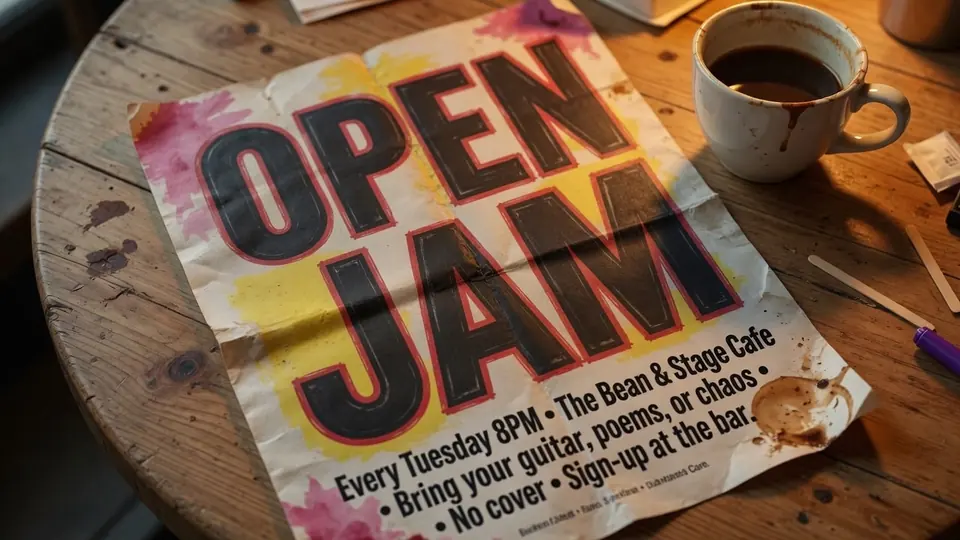
When you only possess an exported image, you need an engine dedicated to handling flattened typography rather than a traditional layout canvas. Using a specialized tool to Edit Text on Flyer allows you to bypass the long wait times of external design studios. The process relies on computer vision to isolate the coordinates of each character string while leaving the rest of the layout untouched.
In this workflow, you enter every single replacement phrase manually into the provided editor fields. The system does not guess what you want to say, nor does it generate automatic translation suggestions that might alter your marketing message. You retain total authority over every digit, date, and venue name, and leaving an input field blank simply removes that line without leaving an empty void behind.
Event schedules shift constantly, turning printed dates, door opening hours, and ticket tiers into recurring administrative headaches. A single change in a festival lineup or guest speaker roster should never force you to scrap hours of creative layout work. By addressing only the specific lines that require updates, you keep your established visual branding intact while reacting to sudden operational changes.
Locking Lines and Protecting Your Composition
Handling complex promotional graphics requires careful precision so you do not accidentally disturb surrounding typography. Within our interface, you will notice a dedicated Lock control attached to every detected line of text. It is vital to understand that this button locks an identified text line in the editor canvas rather than a native Photoshop layer.
When dealing with dense event flyers, headline banners often sit directly against secondary subtitles and sponsor listings. Activating the lock on stabilized lines prevents accidental edits and keeps the bounding areas perfectly isolated while you adjust neighboring details. Once you finish fine-tuning your intended modifications, only the unlocked, edited fields participate in the final generation process.
Transparent Credits, Trial Balances, and Generation Costs
I believe in complete transparency regarding how computational resources and user accounts operate. Scanning an uploaded promotional poster to recognize typography does not deduct any credits from your account. You can freely upload different drafts, inspect the detected bounding boxes, and experiment with your replacement phrasing before commanding the platform to synthesize new pixels.
Every new user who registers an account receives complimentary trial credits to evaluate the rendering quality on real documents. There is no unlimited free generation tier, nor do we provide an automated bulk processing API for massive programmatic dumps. Our infrastructure dedicates substantial graphical processing power to ensure every rendered character blends naturally, meaning generation pricing scales strictly by resolution tiers.
Selecting a 1K resolution export consumes 10 credits from your balance, which works wonderfully for standard social media graphics and digital announcements. Stepping up to a sharper 2K canvas requires 20 credits, delivering the crisp definition necessary for email newsletters and digital display boards. For high-density commercial printing and physical distribution, choosing 4K resolution consumes 30 credits so your paper handouts stay sharp.
Visual Style Reconstruction Versus Traditional Font Files
Many users ask whether our Flyer Text Editor extracts and installs real OpenType or TrueType font files from their images. The simple answer is that raster image files do not contain font files, font tables, or vector hinting instructions. Our engine analyzes the visible letterforms, stroke thickness, perspective angle, drop shadow, and color distribution directly from the surrounding pixels to draw the replacement text organically.
Because this is an advanced visual synthesis process, it is not a mathematically lossless vector replacement. If your original document utilized an ultra-rare boutique typeface with experimental ligatures, the system reconstructs the visual essence rather than calling upon external font binaries. The surrounding surface texture, paper grain, and photographic lighting are carefully blended across the modified zone to deliver a completely natural look.
Traditional graphic artists often spend substantial time manually painting out old lettering with clone stamps and healing brushes. After clearing the background, they must scour type foundries to locate matching fonts, often settling for inferior alternatives. Our visual synthesis eliminates that tedious manual reconstruction by handling the background inpainting and character generation simultaneously, preserving the artistic intent of your original flyer.
Preparing Your Image and Finalizing Output
Before you upload your asset to Edit Text in Image, ensure you provide the cleanest graphic file available. While our engine handles standard web formats gracefully, higher source resolutions always yield more convincing synthesis results. Clean input files provide our computer vision algorithms with rich textural context, avoiding the blurry compression artifacts found in mobile screenshots.
Once your newly generated flyer appears on your screen, take a few moments to inspect the modified zone under magnification. Verify that every digit in your pricing, every letter in your venue address, and every timestamp matches your business requirements. Downloading the 4K render guarantees that your paper handouts remain legible when sent to a commercial print shop for offset reproduction.
Real-World Scenarios and Practical Flexibility
Think about the fast-moving realities of retail, hospitality, and independent event production. A food truck owner might discover that local suppliers updated their seafood pricing overnight, while a music venue might face an unexpected artist substitution. Having the ability to modify locked image assets independently keeps your promotional machine running smoothly through every unexpected operational shift.
You no longer have to endure the frustration of stalled marketing campaigns while waiting on third-party design availability. Small adjustments should never require extensive production overhead or complicated project management negotiations. By taking command of your existing image files, you solve urgent communication bottlenecks directly from your browser so you can focus on serving your customers.
The Bottom Line
Editing a finalized promotional flyer should not force you into expensive creative contracts or tedious full-scale redesigns. When you hold the layered design source file, returning to native software remains the cleanest path forward. When you only possess a flattened raster image, visual text replacement gives you the power to update essential details with free detection, manual text control, and transparent resolution tiers.
Sources
- https://zhuanlan.zhihu.com/p/2065449081007346078
- https://www.zhihu.com/question/29496489
- https://www.zhihu.com/question/657445134
- https://en.wikipedia.org/wiki/Poster
- https://en.wikipedia.org/wiki/Advertising
- https://en.wikipedia.org/wiki/Pamphlet